Friday, August 23, 2019

selenium - wait


  • why?

The elements in a web page load time can vary.
Using "wait", we can enable the script to wait some time before throwing "NO Such Element" exception

C#

  • Thread.Sleep()

Thread.Sleep(3000);
Thread.Sleep(new TimeSpan(0,0,3));
Thread.Sleep(TimeSpan.FromSeconds(3));

Not a good practice. The waiting time is been hard coded and no matter what, the program will wait the time span.
  • Implicit Waits:

Implicit waits tell to the WebDriver to poll the DOM ( frequency is 250ms) for certain amount of time before it throws an exception, if the element is not found immediatelly. That means if the element is found immediatelly, it won't wait. If the elemement is not found immediately, it will re run the find element every 250ms till it find the element and quit. Or if the element is not found during the time, it will throw an exception after the timeout.

Once we set the implicit wait, it will apply to the whole live web driver instance. That means for every finding element operation, there will be an implicit wait.

But as we know, different element has different loading time. For some elements, if it is not been found immediately, we want it stop and quit. We don't want to wait the extra time. And for some other elements, we want it to wait longer time, not the set time in implicit wait.

Implicit wait is flexible than Thread Sleep. But still not a good choice.

driver.Manage().Timeouts().ImplicitWait = new TimeSpan(0,0,5);
driver.Manage().Timeouts().ImplicitWait = TimeSpan.FromSeconds(5);
  • Explicit Wait:
Explicit waits are confined to a particular web element. Explicit Wait is code you define to wait for a certain condition to occur before proceeding further in the code. If the element is not found during the wait, excepation will be thrown. The polling frequency is 500ms. Explicit Wait is only applied to the specific elemnt.

c# install Dotnetseleniumextras.waithelper

WebDriverWait wait = new WebDriverWait(driver,TimeSpan.FromSeconds(10));

IWebElement element = wait.Until(driver => driver.FindElement(By.Name("q")));

Also we can use try catch to catch the exception.

  • Fluent Wait
a class in selenium api. Using Fluent Wait, you can set wait for a specific element, set the polling frequency, max wait time and set to ignore specific exceptions.


Wednesday, August 21, 2019

selenium - xpath

ps:
single slash / : absolute path,from root
double slash //: relative path,from anywhere

Xpath=//tagname[@attribute='value']


  • DOM

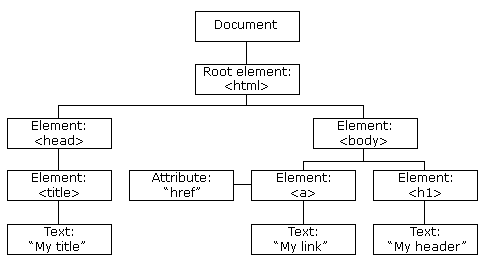
The HTML DOM (Document Object Model)
When a web page is loaded, the browser creates a Document Object Model of the page.
The HTML DOM model is constructed as a tree of Objects:
DOM HTML tree


  • XPath

defined as XML path. It is a syntax or language for finding any element on the web page using XML path expression. XPath is used to find the location of any element on a webpage using HTML DOM structure. The basic format of XPath is explained below with screen shot.
XPath contains the path of the element situated at the web page. Standard syntax for creating XPath is.

Xpath=//tagname[@attribute='value']

// : Select current node.
Tagname: Tagname of the particular node.
@: Select attribute.
Attribute: Attribute name of the node.
Value: Value of the attribute.

1) Basic XPath:
XPath expression select nodes or list of nodes on the basis of attributes like ID , Name, Classname, etc. from the XML document as illustrated below.

Xpath=//input[@name='uid']

2) Contains():
Contains() is a method used in XPath expression. It is used when the value of any attribute changes dynamically, for example, login information.
The contain feature has an ability to find the element with partial text as shown in below example.

Xpath=//*[contains(@id,'message')]

3) Using OR & AND:

Xpath=//input[@type='submit' and @name='btnLogin']

4) Start-with function:

Xpath=//*[starts-with(@id,'message')]

5) Text():

Xpath=//td[text()='UserID']

6) XPath relative

XPath=//*[@id='seleniumsetupTable']/tbody/tr[3]/td[2]

7) table

Predicates are numbers or HTML attributes enclosed in a pair of square brackets "[ ]" that distinguish a child element from its siblings. 

//table/tbody/tr[2]/td[2]
//table/tbody/tr[2]/td[2]/table/tbody/tr/td[2]
//table[@width=\"270\"]/tbody/tr[4]/td

8)How To Handle Dynamic Tables In Selenium Webdriver
https://www.guru99.com/handling-dynamic-selenium-webdriver.html

//To locate table.
  IWebElement mytable = driver.FindElement(By.xpath("html/body/table/tbody"));

  //To locate rows of table.
  IList < WebElement > rows_table = mytable.FindElements(By.tagName("tr"));

  //To calculate no of rows In table.
  int rows_count = rows_table.Count();

IWebElement tableElement = driver.FindElement(By.XPath("/html/body/table"));
IList<IWebElement> tableRow = tableElement.FindElements(By.TagName("tr"));
IList<IWebElement> rowTD;
foreach (IWebElement row in tableRow)
{
   rowTD = row.FindElements(By.TagName("td"));

   if(rowTD.Count > 9)
   {
      if(rowTD[8].Text.Equals("Suspended") && rowTD[10].Text.Equals("Publishing Failed");
      //test failed
   }
}

9)Axes
A step consists of:

an axis (defines the tree-relationship between the selected nodes and the current node)
a node-test (identifies a node within an axis)
zero or more predicates (to further refine the selected node-set)

preceding, following,
parent,child
ancestor,descendant,
preceding-sibling,following-sibling

axisname::nodetest[predicate]


//xxxxx//following-sibling::td[1]
//xxxxx//preceding-sibling::td[@class='xx']//i[@value='xxxx']

10)Chained Xpath
//xxxx//xxxx//xxx

11) locate element in an array
(//xxx[xxx])[x]


git


https://help.github.com/en/articles/adding-an-existing-project-to-github-using-the-command-line

  • Distributed Version Control System
  • Collaboration platform
  • Who made what changes and When
  • Reverse back
  • local and remote repository

git command  most used


echo "# xxxx" >> README.md

git init
Initialize a local Git repository(folder)
git add [file]
Add a file to the staging area, add file to index
git add .
Add all the files 
git rm -r [file-name.txt]
Remove a file (or folder)
git status
Check status of working tree
git commit -m "[commit message]"
Commit changes in index
(touch .gitignore)

git branch
List branches (the asterisk denotes the current branch)
git branch [branch name]
Create a new branch
git checkout [branch name]
Switch to a branch
git merge [source branch] [target branch]
Merge a branch into a target branch

git remote add origin  ssh://git@github.com/[username]/[repository-name].git
Add a remote repository
In Git, "origin" is a shorthand name for the remote repository that a project was originally cloned from. ... Note that origin is by no means a "magical" name, but just a standard convention.
$ git remote -v
# Verifies the new remote URL
git push origin [branch name]
Push a branch to your remote repository
git push -u origin [branch name]
Push changes to remote repository (and remember the branch)
-u option local branch is linked with the remote branch automatically. The advantage is, you may use git pull without any arguments.

git push
Push changes to remote repository (remembered branch)

git clone ssh://git@github.com/[username]/[repository-name].git
Create a local copy of a remote repository
git pull
Update local repository to the newest commit
git pull origin [branch name]
Pull changes from remote repository


git ls-tree --full-tree --name-only HEAD
list the files in branch

git diff
list the difference between branch

How to Contribute and Collaborate

fork the target repo to your own account->clone the remote repo to your local machine->work on your module or make some changes->add your work to the staging area (git add.)->commit your work(git commit -m 'message')->push your work to your fork->create a pull request from browser->pull request will be approved by the owner and added to the main branch


Saturday, August 17, 2019

C# -1

1Difference between static and non static class in c#
A C# static class is a class that can't be instantiated. The sole purpose of the class is to provide blueprints of its inherited classes. A static class is created using the "static" keyword in C#.

  • A static class can contain static members only, including static methods, static constructors, and static properties; You can‘t create an object for the static class.
  • a Non-static class can have static members, including static methods, constructors and static properties; You can create an object for the non-static class. You can only access the static members by the class name, not the instance name. 
  • It is more typical to declare a non-static class with some static members, than to declare an entire class as static.

Example of static class
public static class TemperatureConverter
{
    public static double CelsiusToFahrenheit(string temperatureCelsius)
    {
        ...........
    }
    }
}

class TestTemperatureConverter
{
    static void Main()
    {
        ....
        switch (selection)
        {
            case "1":
                F = TemperatureConverter.CelsiusToFahrenheit(Console.ReadLine());
                break;
            .....
        }
    }
}

Example of static members(static method, static data) in non-static class
public class Automobile
{
    public static int NumberOfWheels = 4;
    public static int SizeOfGasTank
    {
        get
        {
            return 15;
        }
    }
    // Other non-static fields and properties...
}

Automobile.Drive();
int i = Automobile.NumberOfWheels;

2. Create an instance of class. an example of instance of class
public class Addition
{

}


3. What's a constructor in c#

  • the method to initialize the class data members
  • gets automatically invoked whenever an instance of the class is created
  • a method whose name is the same as the name of its type. Its method signature includes only the method name and its parameter list; it does not include a return type
  • If you don't provide a constructor for your class, C# creates one by default that instantiates the object and sets member variables to the default values as listed in the Default Values Table. 
  • A class can have any number of constructors
  • parameters for constructors can be none, some and object
Example
class Geek
{
    String name;
    int id;

    Geek()
    {
     }
    Geek(String name, int id)
    {
        this.name = name;
        this.id = id;
    }
    Geeks(Geeks s)
    {
        name = s.name;
        id = s.id;
    }
}

Geek geek1 = new Geek();
Geek geek2 = new Geek ("test", 2);
Geek geek3 = new Geek (geek2);

  • Static constructor<->Instance constructor
Instance constructors are used to create and initialize any instance member variables.


Static constructors
are used to initialize a static class, or static variables in a non-static class.
static constructors are parameterless
cannot be called directly, only be called by the CLR.
It is invoked automatically before the first instance is created or any static members are referenced.

4. What's Method overloading

  • the common way of implementing polymorphism. 
  • do method overloading by defining two or more functions in a class sharing the same name. (same name, different function)
  • distinguish the methods with different method signatures. i.e. the number of the parameters, order of the parameters, and data types of the parameters 
  • different method signatures can have different return type. But you cannot declare two methods with the same signature and different return type.
Example
  public int Add(int a, int b) 
    {
        int sum = a + b;
        return sum;
    }
    public int Add(int a, int b, int c) 
    {
        int sum = a + b + c;
        return sum;
    }
   public double Add(double a, double b, double c) 
    {
        double sum = a + b + c;
        return sum;
    }

5. Data types in c#

Data types in C# is mainly divided into three categories
Value Data Types, Reference Data Types,Pointer Data Type

  • Value Data Types, derived from the class System.ValueType
most often used, fixed length
TypeRepresentsRangeDefault Value
boolBoolean valueTrue or FalseFalse
byte8-bit unsigned integer0 to 2550
char16-bit Unicode characterU +0000 to U +ffff'\0'
decimal128-bit precise decimal values with 28-29 significant digits(-7.9 x 1028 to 7.9 x 1028) / 100 to 280.0M
double64-bit double-precision floating point type(+/-)5.0 x 10-324 to (+/-)1.7 x 103080.0D
float32-bit single-precision floating point type-3.4 x 1038 to + 3.4 x 10380.0F
int32-bit signed integer type-2,147,483,648 to 2,147,483,6470
long64-bit signed integer type-9,223,372,036,854,775,808 to 9,223,372,036,854,775,8070L
  • Reference Type
don't store the variable value directly
contain a memory address of variable value, refer to a memory location
The built-in reference types are string, object

string type: allows you to assign any string values to a variable,  represents a sequence of Unicode charactersstring s1 = "hello";
object type: it is the base class for all the data types in C#


  • Pointer type

contain a memory address of the variable value.
To get the pointer details we have a two symbols ampersand (&) and asterisk (*).
ampersand (&): It is Known as Address Operator. It is used to determine the address of a variable.
asterisk (*): It also known as Indirection Operator. It is used to access the value of an address.
Syntax
type* identifier;

int* n=&b;


Thursday, August 15, 2019

Jira plus Zephyr


  • Jira

Project management tool for agile development
scrum or kanban template
Issue->Child Issue
Issue can be of different type

Issue life cycle


  • story points

to measure how much effort needed to accomplish one task
not hours

0,1,1,2,3,5,8,13,21
do rough estimates
learn from past estimates, relatively size, relatively


  • Zephyr (app on Jira)Test Case Management Tool 
Native Inside Jira – Manual & Automated Software Testing with Scalability, Advanced Reporting & More

To  Streamline the test cycle phases
Requirement ->Test plan->test design cases->test execution->test report
Test issues can be created, executed, tracked and reported on just like any other Jira issue

integrating with Selenium(automation testing) and Cucumber
SoapUI Pro, Test Complete, Crossbrowser Testing and LoadNinja
jenkins and bamboo-continuous integration tool


Wednesday, August 14, 2019

What is Browserstack, Saucelab, Simulator & Emulator?


  • BrowserStack

World's leading cross browser testing tool, Web app testing
Interactive web-based testing on 2000+ browsers , operational system and real devices instantly. Say goodbye to your lab of devices and virtual machines.

  • Saucelab

Cloud based testing platform, Sauce Labs ensures your favorite mobile apps and websites work flawlessly on every browser, operating system, and device.

  • Emulators

Emulators mimic your target device’s hardware and software on your workstation. Android Emulator (by Android Developer Studio) is a popular example.
The emulator mimics the target/mobile device processor. Then it translates its ISA into the one used by your computer, through a process called binary translation. This binary (ABI–or Application Binary Interface) can be equipped with a compatible operating system and APIs.
Capabilities: The emulator can give you virtual device instances with near-native capabilities and extended controls to adjust the devices'physical sensors, battery state, geolocation, and more.
Limitations: These near-native capabilities come with a significant performance overhead, mostly due to binary translation.

  • Simulators

Simulators let you run programs that were not made for your computer’s OS. In the context of this post, ‘simulator’ refers to the iPhone and iPad simulator in XCode.
The iOS simulator sits on top of your operating system. From there, it mimics iOS and runs your app inside it. This process is viewable in an iPhone or iPad-like window.
Capabilities: The iOS simulator is significantly faster than Android emulator, purely because there’s no machine-language translation involved.
Limitations: The simulator cannot mimic real ios devices like battery states or cellular interrupts, unlike the Android emulator.
.You also cannot use the iOS simulator on platforms other than macOS. This is because the simulator needs Apple’s native Cocoa API–a massive library of frameworks–to handle GUI, runtime, and more.
Porting Cocoa to a different platform is far too much trouble. Instead, developers virtualize macOS on their computer hardware–or procure a MacBook.


Tuesday, August 13, 2019

Security testing


  • What is Security Testing

a type of software testing that intends to uncover vulnerabilities of the system and determine that its data and resources are protected from possible intruders.

  • Types of Security Testing

What is Security Testing: Complete Tutorial

  • How to do Security Testing

corresponding Security processes to be adopted for every phase in SDLC

 What is Security Testing: Complete Tutorial

Security Test should start as early as possible

The test plan should include
Security-related test cases or scenarios
Test Data related to security testing
Test Tools required for security testing
Analysis of various tests outputs from different security tools
  • OWASP Open Web Application Security Project (OWASP) 
Testing Guide: https://www.owasp.org/index.php/Category:OWASP_Testing_Project
https://www.owasp.org/index.php/OWASP_Testing_Guide_v4_Table_of_Contents

  • Tools

netsparker: Vulnerability Scanning tool, scan a system against known vulnerability signatures.

Acunetix:  penetration testing,  simulates an attack from a malicious hacker,  check for potential vulnerabilities to an external hacking attempt

.....


API interview questions

  https://www.katalon.com/resources-center/blog/web-api-testing-interview-questions/ Top 50+ Web API Testing Interview Questions [Ultimate l...